Online Nepali typing keyboard
Click or tap the letters. This is useful when you cannot install a Devanagari keyboard.
Devanagari keys
The keyboard scrolls sideways: swipe to see every key.
- Left little finger
- Left ring finger
- Left middle finger
- Left index finger
- Right index finger
- Right middle finger
- Right ring finger
- Right little finger
- Thumb
Click a key to put the letter where the cursor is, or select text first to replace it. Your keyboard keeps working normally, so you can mix typing and clicking.
Examples
-
क + ् + षक्ष -
न + म + स + ् + त + ेनमस्ते
What a Nepali typing keyboard solves
A Nepali typing keyboard on screen solves the cases where installing one is impossible: shared computers, locked-down work laptops and borrowed devices often refuse new keyboard layouts. This keyboard needs nothing installed and produces the same Unicode text. See also the home typing tool .
How the keys are arranged
The keys are grouped the way the script is taught: independent vowels first, then consonants, then the vowel signs (matras), then the marks that attach to a syllable (halant, anusvara, chandrabindu and visarga), and finally punctuation and Devanagari digits.
Where the characters go
Each key is inserted at the caret in the text box above, or replaces the text you have selected. That means you can mix keyboard typing and clicking freely, and you can fix one letter in the middle of a word without retyping it.
Faster alternatives
Clicking is slower than typing. If you will write more than a sentence or two, phonetic typing with English letters is usually much quicker (see the Roman-to-Nepali and English-to-Nepali pages), and if you type Nepali daily, a system keyboard is quicker still. See also typing practice and the Roman to Nepali page .
The Preeti keyboard layout and this on-screen keyboard
Many offices and print shops in Nepal still work with the Preeti font, and anyone searching for a preeti keyboard usually wants to know which key produces which Nepali letter. This page’s on-screen keyboard follows the traditional Nepali key arrangement that Preeti-style keyboards share: the same five rows, the same Latin keys, and one Devanagari character printed against each cap. It is a Unicode keyboard you click or tap, not the Preeti font itself, so it types ordinary Devanagari that every modern device can display. See also convert Preeti text to Unicode , the Unicode to Preeti converter and practise with the Nepali Typeshala .
How the keys map to Nepali letters
On a preeti keyboard layout a Latin key does two jobs. Unshifted it gives a consonant, a vowel sign or a mark: s is क, v is ख, d is म, and the matra keys f, l and ' give ा, ि and ु. With Shift the same key gives a related character, a half form or a Devanagari digit, which is why Shift and k can give फ while k alone gives प. The layout is positional: each key is tied to one character, and nothing is inferred from the word you meant to write. The chart below shows this arrangement with the Nepali letter drawn large, the Latin key small, and the shift legend on each cap.
Preeti versus phonetic Romanized typing
This keyboard is not phonetic. Phonetic Romanized typing reads the word you mean (type timro and you get तिम्रो because that is how it sounds), and it is what the home typing tool and the English to Nepali page use. A nepali preeti keyboard works the other way round: it is positional, so the same keys always produce the same characters and the tool never guesses a spelling. That is why people who learned on a traditional keyboard often find it fast, while people who type Nepali in Roman letters usually find phonetic typing easier and quicker. Use this page when you need to see or fix a character rather than write at speed, and treat the preeti keyboard download below as a reference sheet rather than an installer.
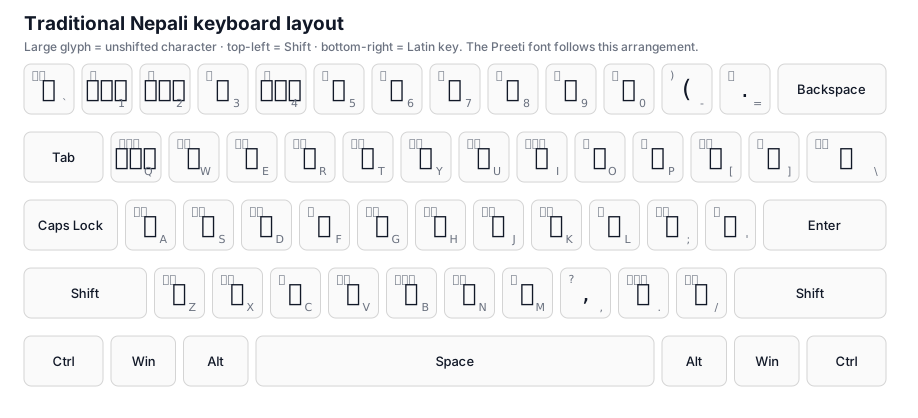
Download the Preeti keyboard layout: a printable SVG chart of the traditional layout, generated from the same key data as the keyboard above.
Questions people ask
Do I need to install a Nepali keyboard?
No. The keys on this page insert Devanagari characters directly into the text box, so the browser does the work.
Can I use it on a phone?
Yes. The keys are large enough to tap and the layout wraps to fit a narrow screen.
What is the Preeti keyboard layout?
The Preeti keyboard layout is the traditional Nepali key arrangement that the legacy Preeti font uses: each Latin key maps to one Devanagari character, with Shift giving a related letter, a half form or a digit. It is positional rather than phonetic, so the same key always produces the same character. The keyboard on this page follows that arrangement.
Is there a Preeti keyboard download?
There is no installer or font file to download here, so this page does not pretend to offer one. What it does offer is a printable preeti keyboard layout chart, generated from the same key data as the keyboard above, which you can save for reference. If you need the Preeti font itself, use a source that grants you a licence to it.
What is a Nepali preeti keyboard and how is it different from Romanized typing?
A Nepali preeti keyboard is a fixed, positional layout: one key, one character, the way a typewriter works. Romanized typing is phonetic and infers the Devanagari from how a word sounds, so timro becomes तिम्रो automatically. Neither is better in the abstract. The positional layout suits people trained on Preeti, while Romanized typing is faster for casual chat.
How can I convert existing Preeti text?
Paste the legacy text into the Preeti to Unicode converter and it returns clean Unicode Devanagari as you type. Read the result and fix anything unusual before you paste it into your document. To go the other way, the Unicode to Preeti converter turns standard Devanagari back into Preeti.